CoreX in detail
CoreX: connect, decide, respond, govern.
The central operations platform built and run by Nexus GP. This page walks through each module, the operating record it writes, how it deploys, how it scales and how a first evaluation is judged.
Schematic views. The product itself is at corex.nexusgp.co; illustrative data where labelled.
- Source Camera 07, restricted-zone rule, 02:14
- Context Loading bay B, after-hours schedule, no booking on file
- Owner Facilities duty team
- Due time Response due within 20 minutes
- Evidence Clip and site photo attached
- Human verification Reviewed by the duty officer
- Closure Closed at 02:31 with the outcome recorded
The operating loop
Five stages, one record, every module.
Each stage of the loop uses a product area you can open today and writes a field of the operating record. The product areas below are the ones visible in the live product.
- Operations Hub
- Overview
- Alerts
- AI Assistant
- CCTV video wall
- Focus
- Cameras
- Playback
- AI overlay
- Analytics profiles
- Devices
- Sources
- Workflows
- Settings
- Team
- Store
The operating loop
-
Connect
Sources, Devices and Cameras register each approved input and map it into one reusable data model.
-
Understand
Overview, maps and the digital twin place the signal against its asset, zone, rule and time.
-
Decide
Workflows hold the rules: condition, severity, routing and cooldown, with a dry-run quick test.
-
Act
Alerts and Focus turn the result into an owned record: acknowledge, assign, comment, attach evidence, resolve.
-
Govern
Team and Settings hold roles, project-scoped permissions and the activity history behind every closure.
Sources, Devices and Workflows
Where signals are registered, mapped and routed: the CCTV Hub, IoT Hub and Integration product areas.
Alerts and Focus
Where a rule result becomes an owned record with acknowledge, assign, comment, evidence and resolve.
Team and Settings
Where roles, project-scoped permissions and activity history are administered for every project.
CCTV Hub
Cameras, streams and AI profiles from mixed brands.
Approved video from different brands can feed the same CoreX application. Common video routes are standard product; deeper vendor functions are a separate, validated integration scope.
-
Video routes
IP cameras, NVRs and encoders: RTSP pull where CoreX reads the video, RTMP push where the source sends it, and WebRTC browser viewing through the media relay.
RTSP pull · RTMP push · WebRTC/WHEP
-
Camera registry
Name the source, place it at a site, manage its stream and enable or disable it from the registry.
One registry for the whole estate
-
Analytics profiles
One profile defines source and model, zones and rule, notify and evidence, and a review of the profile against the real scene before approval.
Source and model · zones and rule · notify and evidence · review
-
Vendor interfaces
Common camera and NVR vendors such as Hikvision, Dahua and Uniview add their own event, playback and control APIs to RTSP video, each built as an agreed adapter and qualified per project on named models and firmware.
Scoped per model and firmware
Schematic views of the configuration. The product itself is at corex.nexusgp.co.
IoT Hub
Sensors, meters and equipment data on one route to usable readings.
Different device families share a common route from raw field to named reading. Device families are integration examples, not a certified hardware list.
-
Device families
Temperature and humidity, air quality, meters for kW, kWh and water, state sensors for leak, open or run, and location links with GPS and link health.
Integration examples
-
Two routes in
IP-ready devices send HTTPS JSON directly or through an MQTT bridge. An RTU or edge gateway translates 4 to 20 mA, dry contact and Modbus signals from older equipment.
HTTPS JSON · MQTT bridge · RTU or edge gateway
-
Device types and field mapping
A reusable schema defines what a device sends and how the application reads it, once for every project that references the type.
Global field mapping
-
Illustrative transformation
temp_raw 286, divide by 10, becomes temperature 28.6 °C. An example rule such as CO2 above 1,000 ppm then raises a review task for the facility team.
Illustrative example
Schematic views. The temperature conversion is an illustrative example, not received telemetry.
Integration
Read approved points. Keep local control.
The integration route follows the data and the job it needs to support. HTTPS ingest and HTTP webhooks are implemented today; MQTT bridges, field-protocol gateways and system adapters are project integration work.
-
Building systems
An approved read-only edge logger reads the agreed points from the existing building management system, for example Siemens or Daikin, over BACnet/IP, Modbus, OPC or API, with each site qualified per project.
- BMS and field equipment
- Approved edge logger
- Map and validate
- CoreX workflows
-
Existing platforms
A REST adapter reads approved telemetry and alarms from a connected platform. Embedded dashboards are another route for existing views.
- Existing platform
- REST adapter
- CoreX monitoring view
-
Doors, forms and webhooks
Door access events, inspection forms and HTTP webhooks can join one case by a configured location, with camera context when available; the form and case-correlation adapters are scoped per project.
- Approved event API or form
- Configured location join
- Case record with evidence
Writing back to equipment is scoped, approved work
HTTP webhook dispatch exists in CoreX today. Approval, command tracking, edge delivery and feedback confirmation, with the states requested, accepted, confirmed and not confirmed, need the scoped command adapter and local safety design.
The read-only path from the building to the platform
- Field equipment
- Local controllers
- Existing building system
- Approved interface
- Read-only edge logger
- Encrypted uplink
- CoreX
AI Analytics
59 catalogue use cases, validated on your scene.
Five application families help select the analysis for the operating problem. Counts and delivery approaches follow the CoreX catalogue; each selected model needs camera-scene validation, and training depends on supported runtimes, approved data and human review.
59 catalogue use cases in five families
-
18
People and safety
Safety helmet detection, people and footfall counting and other people-centred events.
-
13
Access and traffic
Vehicle detection, illegal parking detection and other access and traffic events.
-
12
Fire and facilities
Smoke and flame detection, waterlogging detection and other facility conditions.
-
10
Behaviour and procedures
Phone use or calling, procedure monitoring and other behaviour checks.
-
6
Equipment and quality
OCR and meter reading, surface defect detection and other equipment checks.
-
11 · 4 · 44
Delivery approach
11 standard, 4 configurable and 44 project-specific. Labels describe the delivery approach, not universal availability.
-
Scene · validate · approve
Site configuration
Set the camera, model, zone and threshold; review representative events; confirm useful alerts with the site team.
-
Staged release
Optional model improvement
Curated examples and reviewer feedback, train and compare on a supported runtime, then a limited rollout with human approval and rollback.
Rules and Alerts
From condition to resolved record.
A shared alert record connects the signal to the person who handles it. The views are schematic; delivery channels require configuration and end-to-end testing per project.
-
Set the condition
Severity, timing and cooldown on a selected device field. Quick test gives a dry-run review before the rule goes live.
Condition · severity · cooldown · quick test
-
Choose recipients
In-app alert to selected roles and users, email, Telegram, smart watch message and HTTP webhooks, each enabled per rule; WhatsApp and other channels are configured and tested per project.
In-app · email · messaging · webhook
-
Track the response
Acknowledge, assign, comment and resolve in the Alert Centre, with elapsed time visible against every open alert.
Acknowledge · assign · comment · resolve
-
Worked example
A network failover rule: WAN status equals failover, with in-app delivery to the admin role. An illustrative configuration, not a delivery claim.
Rule = detection · alert response = owner, status and history
Schematic views. They do not establish that a rule fired or that a notification was delivered.
Apps and Dashboards
One view for each job.
Connected data and reusable widgets give each team an application for its work. The editor combines layout, widgets and saved revisions; AI can propose changes that a person reviews and saves.
-
Widgets for each job
KPI values for current or calculated measures, charts and tables to compare history, maps to place information in site context and camera views inside the app.
KPI values · charts and tables · maps · camera views
-
The editor
Choose readings, calculated values, cameras or alert records; select widgets, position them and check field settings; preview the layout and save a chosen revision.
Layout · widgets · saved revisions
-
AI assistance
Describe a change, such as a chart of alerts by severity. Preview the fields, layout and proposed changes, adjust or undo, then save the revision you choose.
Preview only until a person saves
-
Role views
Executives see portfolio health and outcomes, the command centre sees exceptions with map and camera context, and field teams see assigned work and evidence capture.
Executive · command centre · field
Schematic views of the editor and applications, not claimed customer outcomes.
How CoreX is layered
From platform foundation to industry application, in five layers.
Read it from the bottom up. Nine hubs sit on one project foundation; a thin band of setup tools configures each hub for a project; solution domains combine hubs into workflows; applications serve industries. Maturity is labelled wherever an item is planned or a concept.
Read from the bottom up, L0 to L3
-
Industries
Who uses each application. Government buildings and campuses come first; other markets are adjacent or planned.
- Government buildings
- Universities and campuses
- Retail and commercial facilities
- Construction and industrial sites
- Solar farm owners and operators
- Municipal programmes and smart city
- Hotels and managed properties
- Building owners and energy teams
- Airports
-
Applications
Configured for one job and labelled by delivery maturity; planned and concept items are not delivered products.
- Construction safetyValidated on a live scene (configured demo)
- Construction progressSaved app, sample data
- Building securityDemonstration pack
- Campus operationsDemonstration pack (12 instrumented scenarios)
- Building condition inspectionWorkflow demonstration, reconstructed case
- Retail footfall and facilitiesAvailable app with seeded pack, demo data
- Energy management and savingPlanned application on the IoT foundation
- Solar farm operationsPlanned application, sample-data design
- Factory operation and process monitoringConcept
- Network incident workflowPlanned (phase 2)
- Retail shelf attentionFuture phase concept
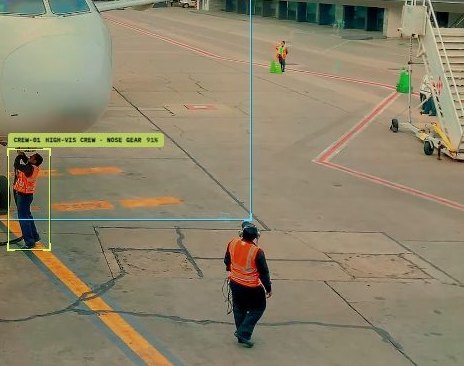
- Airside operationsHistorical reference, no active target
-
Solution domains
Each domain combines hubs into one operating workflow: detect, review, respond and keep the evidence.
- Safety and security
- Energy
- Project and progress management
- Operations and facilities management
- Process and quality monitoring
- Inspection and compliance
- Network operationsPlanned (phase 2)
-
Setup and integration tools
How each hub is configured and integrated for a project; the work Nexus and the local partner do together.
-
- Video analytics profiles
- Streaming and media gateway
-
- IoT data mapping
-
- Connectors and edge logger
-
- Forms designer
-
- Twin integration
-
- Rule editor and notification templates
-
- Dashboard editor
-
- Assistant knowledge and budgets
- Model registry and validation
-
Project foundationProjects and team access · solution modules and branding · cloud, hybrid edge or customer hosted
Platform foundation and hubs
Nine hubs on one project foundation: projects, team access, solution modules, branding and deployment.
-
Hover or focus an item to see what it connects to; select it to keep the connections lit.
Planned, concept, future and historical items are labelled as such and are not delivered products.
Industry applications
The same core, configured for each industry.
Each application links a source, a platform function, an operating workflow and the value to measure. Every card states the delivery maturity of each application; planned, concept and historical items are never described as delivered.
-
Government buildings
Facilities, security and IT teams: disconnected cameras, room conditions, plant and response records.
- Building security Demonstration pack
- Campus operations Demonstration pack (12 instrumented scenarios)
- Energy management and saving Planned application on the IoT foundation
- Network incident workflow Planned (phase 2)
- Safety and security
- Operations and facilities management
- Energy
- Network operations
-
Universities and campuses
Estates, security, IT and sustainability teams: many buildings with separate occupancy, IAQ and incident views.
- Campus operations Demonstration pack (12 instrumented scenarios)
- Energy management and saving Planned application on the IoT foundation
- Network incident workflow Planned (phase 2)
- Operations and facilities management
- Energy
- Network operations
-
Retail and commercial facilities
Mall operations, property managers and FM contractors: fragmented footfall, facilities and maintenance follow-up.
- Retail footfall and facilities Available app with seeded pack, demo data
- Retail shelf attention Future phase concept
- Operations and facilities management
-
Construction and industrial sites
Contractors, site managers and safety teams: hard-to-review CCTV events and disconnected inspection evidence.
- Construction safety Validated on a live scene (configured demo)
- Construction progress Saved app, sample data
- Factory operation and process monitoring Concept
- Safety and security
- Project and progress management
- Process and quality monitoring
-
Solar farm owners and operators
Asset owners, O&M contractors and energy investors whose production, weather and maintenance evidence sit apart.
- Solar farm operations Planned application, sample-data design
- Energy
- Operations and facilities management
-
Municipal programmes and smart city
Programme owners, building owners and assessors: inspection, repair and report evidence scattered across parties.
- Building condition inspection Workflow demonstration, reconstructed case
- Inspection and compliance
-
Hotels and managed properties
Owners, FM operators and engineering leads: fragmented facilities alarms and follow-up. Hospitals: a concept case.
- Building security Demonstration pack
- Energy management and saving Planned application on the IoT foundation
- Safety and security
- Operations and facilities management
- Energy
-
Building owners and energy teams
Owners, FM, energy leads, ESCOs and SIs with fragmented consumption, peak demand and indoor-environment records.
- Energy management and saving Planned application on the IoT foundation
- Energy
-
Airports
A historical airside and cargo demonstration: spatial context, zone events and dispatch. No active target.
- Airside operations Historical reference, no active target
- Safety and security
- Operations and facilities management
Planned, concept, future and historical items are labelled as such and are not delivered products.
Deployment and scale
Cloud now, hybrid connectable, private engineered per project.
The same operating model runs in all three patterns: projects, role-based access, data models, rules, alert response, dashboards and activity history. Sizing and acceptance are project-specific.
-
Fully cloud
Current reference. Applications, platform services, storage and analytics in an agreed cloud region for fast rollout and central portfolio operations.
- Site sources
- Secure internet or API
- Managed CoreX cloud
- Web and mobile users
-
Hybrid edge and cloud
Project-connectable. Local media, customer analytics or a gateway at the site; the control plane in the cloud for central and site teams.
- CCTV, IoT and OT
- Local media or analytics and gateway
- Cloud control plane
- Central and site teams
-
Private data centre
Project-engineered. Platform services and data inside the customer security boundary, hosted by the customer or integrator, for residency and isolation.
- Private site network
- Customer security boundary
- Dedicated CoreX stack
- Internal or approved users
10,000+ endpoints is an architecture target, qualified by load test
The architecture is scale-aware; production capacity is tested for each project. Device inventory, concurrent viewing, AI channels and data retention are sized and load-tested separately before acceptance.
The scale path built into the operating architecture
- Edge and connector topology
- Secure ingest
- Data and event layer
- Operations services
- Role-based views
Multi-project control plane
One control plane across projects, sites and teams.
Organise the estate once, then give each team the view and access it needs. The control plane exists in the product today and centralises operations and evidence while local systems keep control.
Projects
Agency, contract, site and application organised as isolated projects under one administration view.
Users and roles
Central team, customer, operator and field roles, with role templates and project-scoped permissions.
Active operations
Alerts, status, owner, comments and activity history across every connected project.
Connectivity health
Devices, cameras and source connection state, so teams see where attention is needed.
Governance
Cross-cutting governance on every project.
Governance is part of the core, not a module to add later. Native VMS, BMS, network systems and controllers remain authoritative for specialist control.
Project isolation
Each project holds its own sources, applications, rules and users, isolated from every other project on the same platform.
Role-based access
Role templates with module and action permissions, scoped to each project, so each team sees only its work.
Activity history
Every acknowledge, assignment, comment, revision and closure is recorded for audit and reports.
Human approval where required
Configured workflows add approval steps; AI proposals and model updates are previewed and approved by a person.
Phased expansion
From physical operations to networks and governed agents, on the same core.
Capability is added in controlled phases without changing the CoreX platform. Native controllers remain authoritative; any future write-back is connector-specific, allow-listed, approval-gated and commissioned.
Phase 1, now: physical operations
CCTV, IoT, buildings, safety, alerts, dashboards, role-based access and activity history. Connect, detect, respond and track today's projects.
Phase 2, proposed: network operations
Observe first. Read firewall, router, switch and wireless inventory, correlate health, open incidents and track service levels.
Phase 3, proposed: governed domain agents
Context retrieval, cited recommendation, human approval and allow-listed action, adding domain intelligence with accountable control.
Start with a focused evaluation
Select on working evidence, not on a catalogue.
Use existing cameras and a small set of useful events. Agree the test scenes, observation window and acceptance criteria before testing, then select the delivery package on the verified fit.
Name the first site and operating job
Camera and NVR details, approved stream access, screenshots of the reports or dashboards you use today, priority events and the people who respond.
Build the operating example
One connected view, two or three selected events, a response workflow and a scoped integration plan.
Review the evidence
Alert usefulness, response time and completed actions against agreed examples, then confirm fit and expansion scope.
Select the delivery package
Use the verified fit to agree deployment, support, extensions and an itemised quotation.
Delivery and support
Clear roles from delivery to ongoing support.
Agree who owns the customer outcome, the platform work and the local operating service. Pricing, source code, exclusivity and territory are agreed separately.
Partner
Leads the customer relationship, the operating job and the sector solution. After training, configures supported projects, views and rules.
Nexus GP
Provides the product, roadmap, configuration and engineering, tested releases, L3 support and product escalation.
Local technical team
Plans approved connectivity, local deployment, installation, training, handover and the agreed support response.
Enablement kit
Sales story, demo script, user guides, admin guides, training and an escalation RACI.
Commercial paths
A partner subscription or OEM structure, or a perpetual licence of one agreed version with future releases separate.
Next step
Open the product, or name your first site.
Explore CoreX on the product site, or bring the site, the systems you can approve and the exception that matters most, and we will propose one lighthouse scope with the evidence to judge it.